When Octopus connects to a Git repository over SSH, it needs to know it’s talking to the expected server and not an imposter. SSH known hosts record the public keys of the SSH servers Octopus trusts, so Octopus can verify each connection. They work the same way the known_hosts file works on your developer machine.
If you want to authenticate a Git credential with an SSH key, you’ll need to add the SSH host for that repository to your known hosts before you use it. Otherwise Octopus can’t verify the server and the connection fails.

Known hosts are system-wide
SSH known hosts are system-wide. They’re shared across every space in your instance, rather than being scoped to a single space. A host you add is trusted by every space, and a host you remove is no longer trusted by any space.
Manage your known hosts
You manage SSH known hosts by navigating to Configuration ➜ SSH Known Hosts in the Octopus Web Portal.
Octopus pre-seeds the list of known hosts with those of common cloud providers and will keep this list up to date via Octopus version updates.
To add a new known host, provide the host, key type and a hash of the public key in the form <host> <keytype> <publickey> and save.
Octopus accepts these in the same format that ssh-keyscan or your local known_hosts file stores them in. You can copy and paste from your terminal or local file to add them.
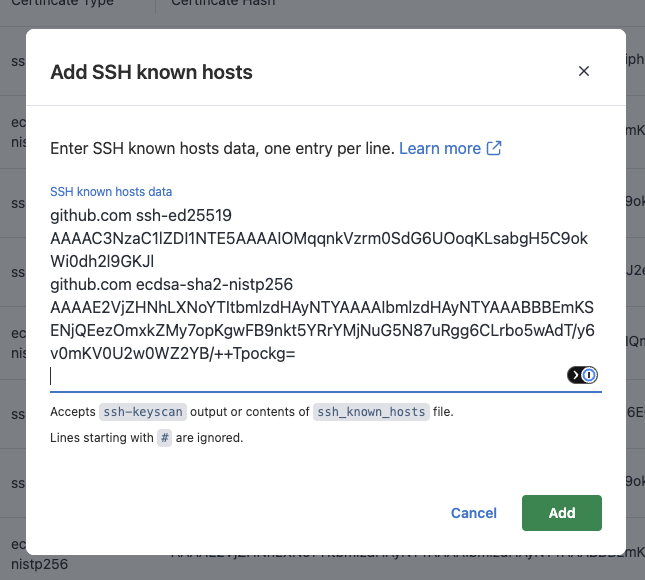
Permissions
Two permissions control access to SSH known hosts:
| Permission | Description |
|---|---|
SshKnownHostsView | View SSH known hosts |
SshKnownHostsAdminister | Add, edit, and remove SSH known hosts |
Because known hosts are system-wide, these are system-level permissions.
Access to Git credentials and SSH known hosts go hand in hand, so the built-in roles that can view or edit Git credentials are also granted these permissions by default. SshKnownHostsView is granted alongside the GitCredentialView permission, and SshKnownHostsAdminister alongside the GitCredentialEdit permission, so most users can view or administer SSH known hosts without any extra setup. For the permissions in each built-in role, see default permissions for built-in user roles. For more information on managing access, see managing users and teams.
Learn more
Help us continuously improve
Please let us know if you have any feedback about this page.
Page updated on Monday, June 1, 2026